Hey everyone, and thanks for stopping by my corner of the blog! If you’re here, chances are you’re either prepping to upgrade your home security, already eyeing a US Standard smart lock, or deep in the weeds on connecting your favorite smart devices to make life easier. A question I get all the time as a US Standard smart lock supplier is: “Does my US Standard smart lock actually work with Alexa?” US Standard Smart Lock
First off, I get why this is such a big question. When smart home devices started popping up a decade ago, a lot of brands locked you into their own ecosystems—like, you couldn’t sync a Nest thermostat with a Samsung smart hub without hoops. These days, though, Alexa’s basically the hub of the smart home world for millions of people. It’s why so many new buyers test every device against Alexa compatibility before pulling the trigger.
Let’s cut to the chase here: Most US Standard smart lock models do work with Alexa, but it’s not a one-size-fits-all thing. I’ve seen way too many customers get tripped up by that “wait, which model is it?” detail, so let’s break this down simply, no tech jargon promise.
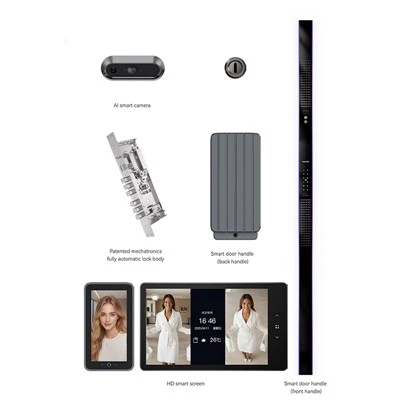
First, let’s talk about how the connection works. Alexa uses a cloud-based system, right? That means your lock doesn’t have to be sitting right next to your Echo device (thank god, I hate when devices have super short Bluetooth ranges) — it connects to your home’s Wi-Fi, which then talks to Alexa’s servers. US Standard smart locks use either Wi-Fi built right in (that’s the most common newer model) or a separate smart bridge (the little device that plugs into your router) if the lock itself doesn’t have Wi-Fi. Either way, as long as your lock’s firmware is up to date, syncing with Alexa is totally doable.
Now, let’s get into the actual setup process, because a lot of people mess this up on their first try, and I get those panicked DMs asking “why won’t my lock show up in the Alexa app!” Let’s walk through the quick steps:
- First, you need to make sure your US Standard smart lock is connected to your Wi-Fi. If it’s a newer model, you’ll set that up via the US Standard app (think: you download the app, create an account, follow the prompts to connect to your home Wi-Fi network—same as you do with your phone). If it’s an older model that needs a bridge, you plug the bridge into an open router port, sync it to the lock, and that’s your middleman between your lock and the internet.
- Next, open your Alexa app (on your phone, whatever) and go to the “Skills & Games” section. You’ll search for “US Standard” — yes, you’ll find the official US Standard skill there. Tap “Enable to Use” and log in with your US Standard account info (the same one you used to set up your lock).
- Once you’re logged in, Alexa will automatically detect all the US Standard devices linked to your account. If it doesn’t, you can hit “Discover Devices” and it’ll scan for a minute. Boom—your lock should show up in your list of Alexa devices.
Wait, but hold on—there are some gotchas here, right? Let’s talk about what doesn’t work. First, if your US Standard lock is super old (like, pre-2018, before they added Wi-Fi to most models), it probably won’t sync directly with Alexa. But even then, we sell little adapter bridges for those older locks that fix that. No need to replace your whole lock if you don’t want to. Second, make sure both your lock’s firmware and your Alexa app are updated. I can’t tell you how often someone says “it worked yesterday” and it’s just because both apps needed a tiny update that pushed a compatibility patch.
Now, what can you actually do with your US Standard smart lock and Alexa, once it’s synced? This is the fun part, not just “hey Alexa, lock the front door.” Let’s list the useful stuff:
- Voice commands, obviously. “Alexa, lock the front door” — that’s the basics. “Alexa, is the front door locked?” — perfect for when you’re leaving for vacation and can’t remember if you turned it.
- Automations. This is where Alexa really shines. You can set up a routine where, say, when you say “good night” to Alexa, it locks the front door, turns off the living room lights, and lowers the thermostat. Or another one: when you get home, your lock detects you unlocked it, and Alexa announces “Welcome home!” and turns on the porch light.
- Guest access alerts. If you give a temporary code to a dog walker, friend, or house cleaner, Alexa can send you a notification when that code is used. No more guessing if someone got in when they said they would.
Wait, but I should be honest here—there are a couple limitations to keep in mind. For example, if you have a US Standard smart lock that only works with Bluetooth (no Wi-Fi or bridge), you can’t sync it with Alexa. Because Bluetooth only works within like 30 feet of your phone, so it can’t talk to Alexa’s cloud servers. That’s why I always recommend getting a Wi-Fi-enabled model, even if it costs a little more upfront—you avoid that limitation entirely. Another thing: some older lock models might only support basic lock/unlock commands, not the more detailed stuff like code tracking. But all our current production models (the ones we’ve sold in the last 2 years) support full Alexa functionality, including event logging and custom routines.
A lot of people also ask: “does Alexa work with all US Standard smart lock variants?” Let’s clarify: we make deadbolts, latch locks, even keypad locks for different door types (wood, metal, glass). Every single one of these variants, as long as it’s got Wi-Fi or a compatible bridge, works with Alexa. The only exception is if you bought a non-smart US Standard lock (like a basic key-and-knob lock) — obviously, those don’t sync with any smart ecosystem, including Alexa. That’s a no-brainer, but I’ve had a customer email me about that before, so it’s worth mentioning.
Now, let’s talk about common troubleshooting, because even with all that, tech glitches happen. I hear these questions every week, so here’s how to fix the most common ones:
- Alexa can’t find my lock when discovering devices: First, check that your lock is connected to Wi-Fi (open the US Standard app to confirm it says “online”). Then, make sure the US Standard skill is enabled in Alexa—sometimes it gets accidentally disabled when you update the app. If that’s not it, try unlinking the skill, closing the Alexa app, reopening it, and re-linking. That fixes 90% of cases.
- Voice commands don’t work: Make sure you’re using the exact name you set for the lock. If you named it “front door lock” but say “lock the door” when you have two smart locks (front and back), Alexa will get confused. So keep names simple and unique, like “front door” or “back door deadbolt.”
- Routines aren’t triggering: Double-check that the routine is set up to activate when your lock’s status changes. Sometimes people set routines for “time of day” instead of “device action,” which is a common mix-up.
At the end of the day, the whole point of a smart lock is to make your life easier, right? No more fumbling for keys in the dark, no more worrying if you locked the door when you’re at the grocery store. And the good news is that US Standard smart locks are built to play nice with Alexa, which is the most popular smart assistant out there right now. We designed our models from the start to support major ecosystems, so you don’t have to jump through weird hoops to get them working.
Wait, I should also mention—if you’re in the market for a US Standard smart lock specifically, we’ve got a bunch of options tailored to different needs. Whether you’re renting an apartment (our latch locks are super easy to install, no drilling required) or own a home and want a heavy-duty deadbolt, we’ve got you. And all of them are tested for Alexa compatibility, so you don’t have to worry about buying something that won’t work with your Echo devices.
If you’ve been on the fence about whether a US Standard smart lock works with Alexa, I hope that cleared things up. It’s way simpler than a lot of online guides make it sound, and it’s one of the best upgrades you can make for your home security and convenience.
If you’re ready to pick up a US Standard smart lock or have more questions about compatibility, feel free to reach out to our team to talk through your needs. We’re here to help make sure you get the right lock, easy setup, and all the Alexa functionality you want.
Aluminium Smart Doors References:
- Consumer Technology Association. (2023). Smart Home Ecosystem Compatibility Report.
- US Standard Smart Lock Technical Support Documentation. (2024). Alexa Integration Guide.
- Amazon Alexa App Developer Portal. (2024). Compatible Smart Lock Devices List.
- National Locksmith Association. (2023). Smart Home Security Best Practices for Residential Locks.
Guangdong Ap Tenon Sci. & Tech Co., Ltd.
Guangdong Ap Tenon Sci. & Tech. Co., Ltd. is one of the most professional us standard smart lock manufacturers and suppliers in China. With abundant experience, we warmly welcome you to wholesale advanced us standard smart lock made in China here from our factory. Also, OEM service is available.
Address: No. 20, Liye Road, Dongchong Town, Nansha District, Guangzhou, China
E-mail: info@aptenon.com
WebSite: https://www.tenondoorlock.com/
